Our Products

From Field to Office, Solutions Your Way

All agencies working in Developmental Sector require a robust system for managing and monitoring their projects. There is also a need for having a very efficient workflow system for better internal operations and donor engagement.

ProMIS is a customizable end-to-end Project Management and Workflow Automation Application developed specifically for Development Sector consisting of a collection of the following Modules:
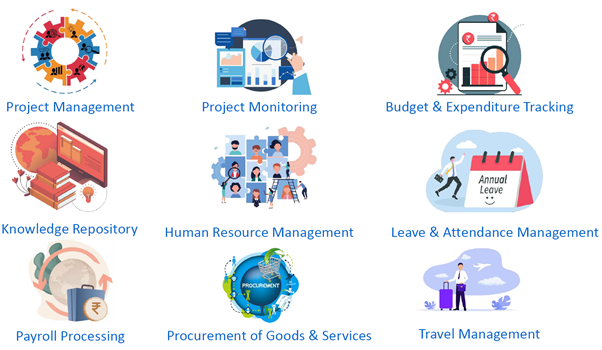

  • Project Management
  • Project Monitoring
  • Online/Offline Data Capture
  • Analytics and Dashboard
  • Budget and Expenditure Tracking
  • Knowledge Repository
  • Human Resource Management
  • Payroll Processing
  • Leave and Attendance
  • Procurement of Goods and Services
  • Travel Management

Modules


Project Profile

  • Project Name and a brief description.
  • Mapping of the Project Grant Agencies (Donors) and Partners.
  • Budget Distribution for the Project and its Disbursement Schedule.
  • Geographic Locations covered by the Project (States, Districts, Blocks and Villages).
  • Mapping of Thematic Area addressed by the Project.
  • Duration of the Project (Start Date, End date).

Project Activities

  • Identification of Activities to be carried out under the Project.
  • Activity Name and Description.
  • Geographic Locations for the Activity (States, Districts, Blocks and Villages).
  • Duration of the Activity (Start Date, End date).
  • Mapping of Budget Heads to Activities.
  • Assigning Targets for Impact Analysis.

Project Staff

  • Mapping of Staff Members to the Project.
  • Integration with HR Database.
  • Budget Allocation for Staff Renumeration.
  • History of Assignment with the Project (Start Date and End Date)
  • Role as Project Staff.
  • Activities assigned to the Staff Member.
  • Geographic Jurisdiction for the Staff Member.

Project Resources

  • Resources Repository related to Project.
  • Photo Galleries.
  • Videos.
  • Case Stories.
  • Documents.

Dynamic Surveys and Data Capture

  • White labeling and integrating our tool called METEOR to create Dynamic Questionnaires and activity forms dynamically for various projects.
  • Forms can be deployed to collect data using Online Web Based application or Off-line Android Mobile App.
  • Variety of Question Types supported as listed below:
    • Binary Option (True/False, Yes/No/NA).
    • Current Date/Time.
    • Date/Time Range.
    • From Master List with Level Filtering.
    • Logged in User Details.
    • Multiple Choice , Multiple Options.
    • Multiple Options with Text.
    • Single choice, Multiple options.
    • Single Option Numeric/Alphanumeric.
    • Single Option Date/Time.
    • Picture Field/QR Code.


  • Cloning of questions, question sections and questionnaires.
  • Dynamic specification of Validations.
  • Specifications of Skip, Disable/Enable Rules.
  • Computed Fields with multiple computation options.
  • Textual/PDF/Video Instructions at any point in the questionnaire.
  • Dynamic Colour Themes.
  • Dynamic Search Fields.
  • Multi-lingual forms/questionnaires.
  • Deployment of Forms for data collection against various activities in projects (Integration with Project Management)
  • Selective Deployment for different locations and jurisdictions and field staff.
  • Expiry Date for forms so that data entry after this date can be prohibited.


  • Online Web Based Data Capture Tool that works on all Browsers.
  • Offline Mobile App Based Data Capture Tool that works on all Android phone/tablet devices.
  • Deployed forms automatically Available for Data Capture depending upon the jurisdiction and the access rights of the user.
  • Easy to Operate with Innovative Design organized into logical tabs to avoid cluttering.
  • Saving data in Draft Mode for further editing.
  • Completed data in Submitted/Uploaded form. Data collected in offline mode is Synchronized with server after submission, on demand or in auto-sync mode.
  • Auto-Filling of header fields


  • Full Audit Details with Time Stamping such as who captured it, when it was added or edited.
  • Geo-tagging of data collected using mobile devices.
  • All data records tagged with a system generated Unique Identifier.
  • All the data Validated based on the validation defined at the time of questionnaire building.
  • Powerful Navigation Features.
  • Data entry driven by defined Skip Rules and Validations.
  • A good Disaster Recovery Feature to minimize the possibility of data loss.
  • Support all commonly used Android Phone/Tablet Devices.

Unified Dashboard and Reporting

  • Grid based Interface for displaying the data captured against a questionnaire.
  • Indicator Mapping to captured data.
  • Mapping of Achievements against Targets for Impact Analysis.
  • Graphic Dashboard with rich data visualization, including charts and maps.
  • Exported to Excel, CSV and PDF format.
  • Server-based Reporting platform.
  • Scheduled Report processing, or access reports on-demand.
  • Powerful Search and Filter facility to access a sub-set of data based on the search criteria.
  • Role and Jurisdiction Based Access to the data for viewing or editing.
  • Quality Control feature to Supervisors to validate and approve the captured data.

Budget & Expenditure Tracking

  • Automates the Existing Processes prevailing in the organization.
  • Driven by the Financial Year, Donor, Project and Activity based Budgets.
  • Allocation of Budget (Planning) for various activities under a project and also for non-project expenditures.
  • Planning Approval Process defined using Dynamic Approval System.
  • Automates the process of Expense Request and Tracking.
  • Expense Request is assigned a Unique Identification Number
  • Mapping of the Budget Heads and Projects/Activities.
  • Realtime Monitoring of the Budget Status.
  • Alerts for spend overflows.
  • Integration with Purchase/Work Orders and Invoice Processing.
  • Budget/Expenditure related MIS Reports and Analytics.

Knowledge Repository

  • A fully functional ‘Digital Content Management System’ for storing content in any digital format with advanced searching, retrieval and dissemination facility.
  • The digital content to include Documents (PDF Reports, Training Handouts, Stories etc.), Images, Videos, Data Sheets, Info Graphics etc.
  • Digital Content Hyperlinked to Other Websites also supported.
  • Embedding of YouTube Videos.
  • Digital content Accessible Anytime and From Anywhere over desktop/laptop and mobile devices.
  • Standard Metadata for content will be created including provision for search keywords and tags.
  • Organized in a Thematic Hierarchy for easy classification.
  • Auto-generation of Thumbnails.


  • Complete History of all Actions - upload, review, publish and archive.
  • Controlled by an Approval Work Flow.
  • Access controlled by Roles (Contributors, Reviewers, Approvers and Viewers).
  • Contributor-Approver exchanges with Auto Notifications.
  • Entire History of Approval Process.
  • Sophisticated Search Features will be provided to accessing the content.
  • Searches can be saved for later re-use (My Searches).
  • Viewing the content Online or Downloading to user device.
  • Feature for Star Rating of the content.
  • Sharing of Content through emailed links.


  • Auto Email Notifications when content is published.
  • Dynamic Definition of Themes, sub themes, formats and types, content classification nomenclature.
  • Restricted Access to Confidential Documents.
  • Archiving of Content.
  • Document Publication Planner with Calendar.
  • Analytics of Enterprise-Wide Usage through in-depth analytical reports on user behaviour, popular themes, period wise downloads and views.

Employee Roster

  • Employee Roster containing the personal profiles of the employees such as:
    • Personal Information.
    • Duty Station.
    • Designation.
    • Contact Information including Emergency Contacts.
    • Educational History.
    • Past Experience History.
    • Dependent Relationship Details.
    • Training and Certification Details.
    • Reference Checks.
    • Identification Documents.
    • Bank Account Details.

Employee Hiring

  • Automation of Employee Hiring Workflow.
  • Requisition/Hiring Form.
  • Vacany/Post Details.
  • Justification for Hiring.
  • Job Title, Designation, Employment Type and Reporting Information.
  • Educational and Experience Requirements.
  • Renumeration with CTC Breakup.
  • Project/Budget Line Mapping.
  • Auto-Generation of JDs (Multiple Templates).
  • Candidate Portal for Online Filling of Personal and Professional Details.
  • Details of Interviews/Tests and Candidate Evaluation.
  • Candidate Selection.
  • Approval Workflow.

On-Boarding/Contract Handling

  • On-Boarding Formalities.
  • Auto-Generation of Appointment Letters/Contracts (Multiple Templates).
  • Assets Allocations.
  • Approval Workflow.
  • Contract Renewals.
  • Relocations.
  • Increments and Promotions.
  • Project Reassignments.
  • Full History of Contract Changes.
  • Insurance Management.

Appraisals

  • Online Employee Appraisals and Performance Management.
  • Star Rating against KRAs (Dynamic and Designation-wise).
  • Multi-Level Assessments.
  • Multi-Term Appraisals.
  • Auto-Scoring of Employee Performance.
  • Full History of Appraisals.
  • Performance Analytics and Reports.

Separation

  • Automated Workflow for Separation Process.
  • Notice Period Management.
  • Assets Recovery.
  • Online Exit Interview.
  • Full and Final Settlement Details.
  • Approval Management.
  • Auto-Blocking of Access.

Other Features

  • Employee Self-Service Portal with these features:
  • Update of Personal, Professional and Training Information.
  • Update of Dependent Information.
  • Update of Bank Account Details.
  • Request for Issuance of Certificates and Salary Statements.
  • Management of Assets Issued to Employees.
  • Birthday and Anniversary Greetings.
  • Star Employee Handling.
  • Full Repository of HR Related Documents.
  • HR Related Analytics and Reports.

Attendance and Leave Management

  • On-line Leave Management (annual, sick leaves, compensatory, maternity, paternity, LWOP etc. as applicable to the organization.
  • Integrated Mobile Phone based Attendance System to mark attendance from anywhere.
  • Integration with Access Systems (Bio-Metric etc.)
  • Maintenance of Time Cards.
  • Pre-defined Leave Approval Work flow.
  • Leave Dashboard showing the employees on leave or on duty travel.
  • Display of Leave Balances online.
  • Integration with Holiday Master.
  • Leave/Attendance related Reports and Analytics.

Payroll Processing

  • Automatic Monthly Payroll Processing.
  • Integration with HR Module for Entitlements and Attendance.
  • Auto-Computation of Entitlements.
  • Auto-Computation Standard Deductions (EFP, Insurance, TDS etc.).
  • Provision for Short/Stop Payments and Other Deductions.
  • Handling of Special Allowances.
  • Dynamic Linking to Employee Bank Account.
  • Auto-Generation of Monthly Bank Payment Advice for Salary Disbursement.
  • Full Approval Workflow.
  • Generation of Payroll Statuary Reports and Salary Statements.

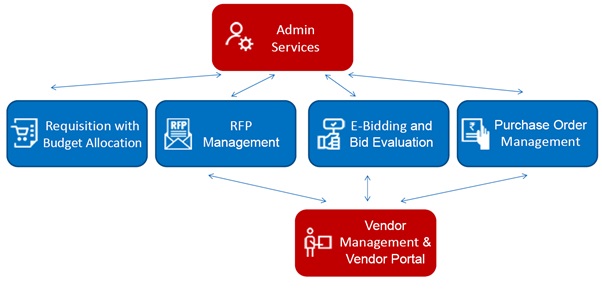
Procurement Management System - Modules

Requisition

  • Online Paper Less System to initiate a requisition request electronically.
  • Provide Justification for the procurement.
  • Define the Delivery, Installation and Training requirements.
  • Identify the Budget Lines and work out estimated cost in INR and USD.
  • Allow drawing funds from Multiple Budget Lines with check on fund availability.
  • Define Technical and Financial Evaluation criteria.
  • Identify the Consignees to receive the good or services.
  • Allow requesting units to precisely Specify Services or Goods to be procured.
  • Integrate an Asset Master (Major and Minor categories) to support the identification of goods and services.
  • Define and upload Exact Specifications of products to be procured and Terms of Reference (TOR) for service contracts.


  • Automate the process of defining an Approving Route for the slab-based procurement process.
  • Drive the requisition through the approving route using Email Notifications and reminders.
  • Use Electronic Approval System to eliminate the use of paper based operations.
  • Route the checklist electronically to Budget Owners for Finance Control.
  • Track RFPs and Bids generated against the Requisition.
  • Track Purchase Orders issued against the Requisition with Fulfillment details.
  • Create and maintain a Repository of all Support Documents for the Requisition.
  • Provide a Reporting MIS to allow procurement team to generate Requisition analytics.

RFP Management

  • Automate the process of RFP Management.
  • Define RFP Deadlines (Posting, Briefing, Closure, opening).
  • Link a RFP process to Approved Requisitions. Multiple RFPs can be generated for a single requisition or a RFP may combine multiple requisitions.
  • Create RFP Document (Request for Quote/ Request for Proposal /Tender) using pre-defined templates for various types of procurement.
  • Link Goods and Services as defined in Requisition to the RFP.
  • Allow Selection of Vendors from the vendor database and tracking their responses.
  • Automate the process of defining an Approving Route for the slab-based procurement process.
  • Post RFP Email with Attachments to vendors.
  • Issue and mail Amendments and Revisions to RFP with History of the same.
  • Provide a Reporting MIS to allow procurement team to generate RFP analytics.

e-Bidding and Bid Evaluation

  • Automate the process of Bidding and Bid Evaluation.
  • Allow vendors to Submit Quotations Online with all supported documents using the Vendor Portal.
  • Use Standard Formats for capturing vendor quotes online.
  • Allow Electronic Opening of Technical and Financial Bids.
  • Perform Technical Evaluation online to qualify vendors.
  • Allow creation of online Cost Comparison Sheet for Financial Evaluation.
  • Select the Successful Vendor using overall score based rating with override option.
  • Provide a feature for Price Negotiation with selected vendor(s).
  • Automate the process of defining an Approving Route for the slab-based procurement process.
  • Create and maintain a Repository of all Support Documents for the bid process.
  • Provide a Reporting MIS to allow procurement team to generate bid analytics.

Purchase Order

  • Automate the process of Purchase/Work Order issue and fulfillment.
  • Link PO/Service Agreement process to Bids that have been duly approved.
  • Allow Adjustment of Quantities in the PO based on the approved quantities at bid level.
  • Create Purchase Order using pre-defined templates for various types of procurement.
  • Route Approval Requests required depending upon the value of the PO/Contract
  • Send PO Email to vendors.
  • Issue Amendments and Revisions to PO and maintain a History of the same.
  • Track Invoices and Payments against the PO with other Fulfillment requirements.
  • Create and maintain a Repository of all Support Documents for the PO process.
  • Provide a Reporting MIS to allow Procurement Team to generate PO analytics.

Vendor Management and Vendor Portal

  • Provide an Online Vendor Portal that will allow vendors to register for providing Goods and Services and to participate in e-Bidding.
  • Allow vendors to Sign Up in a secure manner and to manage their passwords.
  • Allow vendors to Create and Manage their Profile Online that includes
  • Identification Details of vendor.
  • Details about company’s Legal Status.
  • Certification details.
  • Identification of Goods/Services Offered by the vendor.
  • Primary and secondary Contact Details and details of Branch Offices.
  • Financial Status of the vendor for last three years with documented proof.
  • Details of the Registration with statuary authorities with documents.
  • Details of Bank Account.
  • Self Declaration for conforming to various legal conditions.

Vendor Management and Vendor Portal

  • Support various types of vendors such as Business Companies, Specialized Agencies and Individuals.
  • Registration process driven by automatic Email Notifications at various levels.
  • Procurement team can review the vendor profile and Accept or Refuse Registration request.
  • Maintain a Rating of Vendor Performance based on projects executed.
  • Vendors can be De-Activated or Blacklisted.
  • All RFPs of Interest to Vendor get displayed in the Vendor Portal.
  • Vendors can Submit Technical and Financial Bid Online using Vendor Portal.
  • Vendors can Accept, Withdraw Bids and Negotiate Online using Vendor Portal.
  • Create and maintain a Repository of all Support Documents for the Vendor.
  • Provide a Reporting MIS to allow Procurement Team to generate Vendor analytics.

Travel Management

  • Automation of Travel Process.
  • Create Online Travel Authorization with details for the travel like travel dates, places, reason for the travel etc. along with link to scanned copies of supporting documents for ease of approval.
  • Maintain Per-diem Masters for various staff categories and various destinations.
  • Create Travel Itinerary.
  • Allow Online Routing of Travel Requests to various levels of approvers based on the previously mapped levels of approvers.
  • Email Notification of approved status to initiator, traveler and travel desk coordinator.
  • Submit and Settle Online Travel Claim (TC) form along with link to scanned copies of boarding pass, travel report and hotel bills (if required).
  • Generate MIS Reports on travel.

General Features of the Application

  • The application works on compatible user platforms through Standard Web Browsers (Internet Explorer/Mozilla Firefox/Google Chrome etc.).
  • Comprehensive Data Output and Query (Reporting System) Facility for reporting and analytics with Export to multiple formats such as CSV, MS Excel and PDF.
  • Role Based access to various modules and functions.
  • Intuitive structuring of Menus and Navigations and a user-friendly UI/UX.
  • Support a Dynamic Approval System with the facility of defining approvers and reviewers for any process with auto-delegation to backup approver in the absence of main approver.
  • Secure Login with Complex Passwords to business users at various levels with Auto-Sign Up, Forgot and Reset Password features.
  • Provide a facility for Notifications and Alerts using Email.


  • Efficient Data Storage architecture with Encryption, Backup and Security features.
  • Support Multiple Currencies with an option of entering exchange rates on Monthly Basis.
  • Customized Electronic Signature feature, if required.
  • Provide Audit Trail for all system events with time stamps and super-user will have access to these audit trail logs.
  • Secured Application Architecture based on Top 10 OWASP Security Principles and not vulnerable to hacking and security intrusions.

Admin Services

  • Provide Admin Services for supporting the application.
  • Maintenance of Application and Module Specific master records.
  • Manage Users, Access Rights and Roles.
  • Create Dynamic Approval Matrices for various processes.
  • Manage Asset Master for Item Classification.
  • Manage Audit Logs.
  • Manage Auto-Email Alerts.

Hosting Options

  • Application can be used with Fully Managed Hosting Service as part of offering.
  • Proactive Virus and Malware Protection and up-to-date Patches and Updates.
  • The application will be SSL Certified.
  • Nightly Revision Backup will be performed.
  • Alternately, application can be hosted on Client Servers/Cloud environment with full support for operations.

Customization Options

  • Application can be Customized to meet the Client Specific requirements.
  • Multi-country Operations possible by building a Country Layer with Country Specific Settings and Business Rule.
  • Can be integrated with other applications such as Business Central and other ERP applications using APIs for Budget, Vendor and Invoice handling
  • Can be designed to support Branding and Themes as per Client guidelines.
  • Can operate in Different Time Zones.

Deliverables

  • Fully tested and working version of the Web Application and Database meeting all requirements.
  • Installation, Configuration and Deployment of application and database on the staging and production servers.
  • Hosting Services for Staging during the development and testing phase.
  • Hosting services for Live Operations, as optional.
  • Facilitating of User Acceptance Testing (UAT).
  • Sharing of Source Code for application and periodic updates (specific cases).
  • Technical and User Manuals (electronic copies only).
  • Training Sessions for admin and other application users.
  • Security Audit and Certification by an authorized third-party agency.
  • Free Maintenance and Warranty Support for 1 Year after implementation and roll out.